
When you first get your MikroTik device, the very first thing you usually search for is the Mikrotik router default password. Without the correct login details, you cannot access the control panel, change Wi-Fi settings, or secure your network. Therefore, knowing this information is extremely important.
Many people feel confused because MikroTik routers operate a little differently from other brands. In fact, some users even assume their router is broken because the Mikrotik router default password is not working. However, most of the time, the actual reason is that they don’t understand how MikroTik handles its default login.
Thus, in this guide, you will learn everything about the Mikrotik router default password, how to use the Mikrotik Default Login, how to perform a Mikrotik router default password reset, and what to do if you face a mikrotik router password forgot situation.
What Is the MikroTik Router Default Password?
First of all, here is the truth: most MikroTik routers do not come with a pre-set password. Yes, that is correct. The default login credentials for most MikroTik devices are:
- Username: admin
- Password: (leave empty/blank field)
- IP Address: 192.168.88.1
Consequently, when logging in for the first time, you simply type admin in the username box and leave the password blank. This is called the Mikrotik Default Login method. Many users enter a password repeatedly and then complain that the mikrotik router default password not working, while the reality is that most routers have no default password at all.
MikroTik Default Login – How To Access Your Router
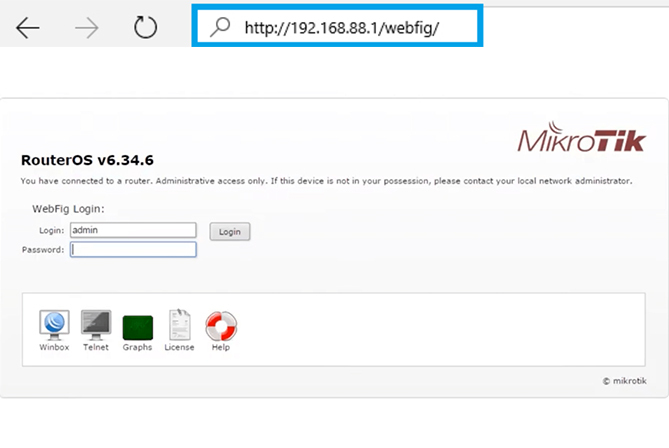
To access your router using the Mikrotik Default Login, follow these steps:
- First, connect your phone or computer to the MikroTik network.
- Then, open any web browser such as Chrome, Edge, or Firefox.
- Next, type http://192.168.88.1 in the address bar.
- After that, enter:Username: admin &Password
- Finally, click Login.
Usually, this will open the MikroTik dashboard. Otherwise, your Mikrotik router default admin password might have been changed, or the IP address could be different.
MikroTik Router Default WiFi Password
Now let’s talk about the mikrotik router default wifi password. In many MikroTik models, Wi-Fi is open by default, which means there is no pre-set Wi-Fi password. As a result, you may connect without entering any password at all.
However, this is not safe. That is why, once you log in, you should immediately create a secure password.
Many users search for:
- First, Mikrotik router default wifi password
- Second, Mikrotik router default admin password
- Third, Mikrotik 4g router default password
But the answer remains the same; in most cases, the Wi-Fi password is blank until you make one yourself.
MikroTik Router Default Password Not Working – Why and Fix
If you are facing the issue that the Mikrotik router default password is not working, don’t worry. This is very common. However, it can be fixed easily.
Here are simple reasons and solutions:
1. Password Already Changed
If someone else has already used the router, then the Mikrotik router default password might have been changed.
Solution: You will need to perform a Mikrotik router default password reset.
2. Wrong IP Address
Sometimes, the router IP is not 192.168.88.1.
You must:
- Check the IP twice and enter the correct login IP.
- You can switch the browser/ clear the browser cache and cookies.
As a result, sometimes this fixes the issue.
3. Try WinBox (Recommended)
If the browser login does not work, you can use WinBox, a MikroTik tool that helps you connect easily.
With WinBox, even if you don’t know the IP, you can still detect the router automatically.
MikroTik Router Password Forgot – What To Do
If you are in a Mikrotik router password forgot situation, then the only real option is a factory reset. Thankfully, this is easy.
MikroTik Router Default Password Reset Steps
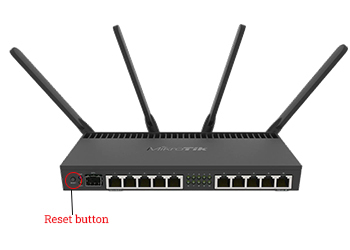
- First, power OFF the router
- Then, press and hold the Reset button
- While holding it, power ON the router
- Keep holding for seconds
- Release when the light starts blinking
Now the device is reset, and your Mikrotik router default password reset is complete.
You can again use:
- Username: admin
This method also works for Mikrotik 4g router default password reset.
MikroTik 4G Router Default Password
If you own a 4G LTE MikroTik device and are looking for the Mikrotik 4g router default password, the process is exactly the same.
- First, default login: admin
- Next, no password
- Finally, IP: 192.168.88.1
Therefore, even in 4G models, the Mikrotik Default Login rules stay the same.
If the mikrotik router default password not working on your 4G router, then resetting is the best option.
Change MikroTik Router Default Password (Very Important)
Once you log in, you should never leave it blank. So, follow these steps for mikrotik router default password change:
- First, go to System
- Then, click on Users
- After that, double-click click admin
- Now, type your new strong password
- Finally, click Apply and OK
As a result, your network will be protected from hackers and unwanted users.
Common Issues and Solutions
| Issue | Solution |
| First, Mikrotik router default password not working | Reset router |
| Second, Mikrotik router password forgotten | Use the reset button |
| Third, Mikrotik Default Login fails | Try WinBox |
| mikrotik router default wifi password unknown | Set a new password |
| Slow internet | Update firmware |
| Cannot access the panel | Check IP address |
This table makes it easier to understand common problems.
Why You Must Change the Default Password
Leaving the Mikrotik router default admin password empty is dangerous. Anyone nearby can enter your network. Therefore, always set a password that:
- Firstly, has at least 8–12 characters
- Next, includes letters and numbers
- Then, uses symbols like @, #, %
So, after logging in and mikrotik router default password change, your network becomes much safer.
Final Thoughts
In conclusion, the mikrotik router default password is usually blank. Because of that, users often think something is wrong. But in reality, that is how MikroTik is designed.
If your mikrotik router default password is not working, then a simple reset can solve the issue. And if your mikrotik router password forgot, then resetting is the only way to regain access.